
If you are building an LLM application that needs to interact with internal documentation, private wikis, or real-time data, you cannot rely on model weights alone. You need RAG (Retrieval-Augmented Generation).
RAG grounds an LLM’s responses in authoritative, external sources. While the concept sounds simple, moving a RAG system from a basic prototype to production requires a clean, scalable architecture.
In this post, we’ll break down the two-pipeline architecture behind enterprise RAG and implement a clean, state-of-the-art solution using LangChain Expression Language (LCEL).
🏗️ The Core Architecture: A Tale of Two Pipelines
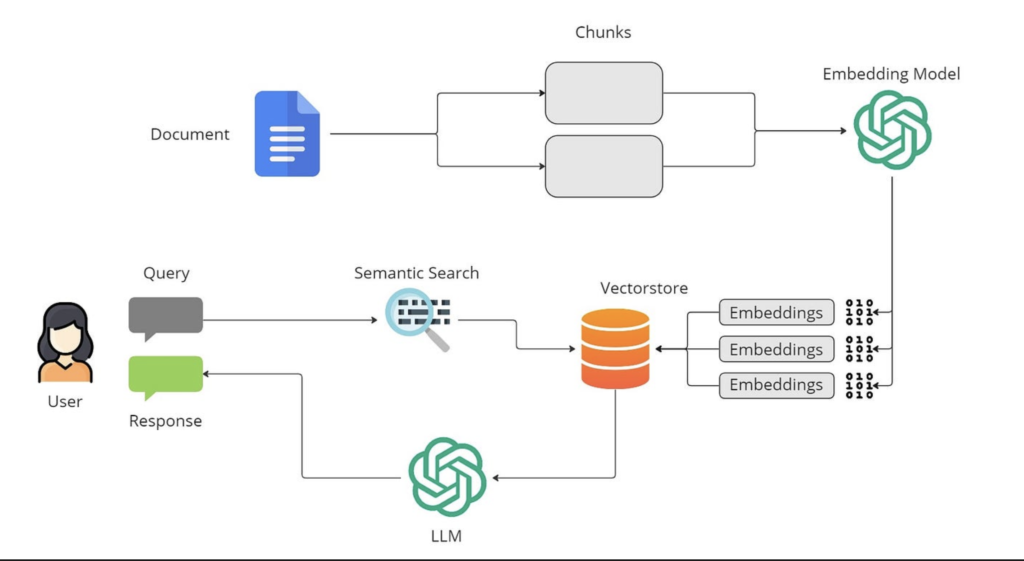
Every production RAG system is split into two distinct, independent pipelines. Understanding this split is the key to scaling your application.
1. The Indexing Pipeline (Offline)
This pipeline runs asynchronously (e.g., nightly batch jobs, webhooks, or database triggers). It converts raw documents into a searchable index.
- Load: Ingesting raw PDFs, Markdown files, or API payloads.
- Split/Chunk: Breaking large text documents into bite-sized semantic fragments.
- Embed: Converting chunks into high-dimensional vectors capturing semantic meaning.
- Store: Writing vectors and metadata into a highly optimized vector database.
2. The Query Pipeline (Online/Runtime)
This pipeline runs in real-time when a user asks a question, executing in seconds:
- Vector Search: The user’s query is embedded, and the vector store returns the top $k$ matching chunks.
- Augment: Chunks are compiled into a highly structured prompt context.
- Generate: The LLM consumes the prompt and streams back a factual response.
🛠️ Step-by-Step Implementation with LangChain
Let’s write clean, modular Python code to implement both pipelines using modern LangChain packages (langchain-core and langchain-community).
Prerequisites & Setup
First, install the required packages. We will use FAISS as our lightweight local vector store and OpenAI for our embeddings and generation.
Bash
pip install langchain langchain-openai langchain-community faiss-cpu tiktoken
Make sure your API key is configured in your environment:
Bash
export OPENAI_API_KEY="your-api-key-here"
Part 1: The Indexing Pipeline
Let’s load a sample document, split it recursively with smart boundary preservation, embed it, and save it locally.
Python
from langchain_community.document_loaders import TextLoader
from langchain_text_splitters import RecursiveCharacterTextSplitter
from langchain_openai import OpenAIEmbeddings
from langchain_community.vectorstores import FAISS

# 1. Load Document
loader = TextLoader("company_policy.txt")
documents = loader.load()

# 2. Chunk Text Structurally
text_splitter = RecursiveCharacterTextSplitter(
    chunk_size=600,
    chunk_overlap=120,
    separators=["\n\n", "\n", " ", ""]
)
docs = text_splitter.split_documents(documents)

# 3. Generate Embeddings & Save to Vector DB
embeddings = OpenAIEmbeddings(model="text-embedding-3-small")
vector_store = FAISS.from_documents(docs, embeddings)

# Persist the vector database locally for the query pipeline
vector_store.save_local("faiss_index")
print(f"Successfully indexed {len(docs)} chunks!")
Production Tip:
RecursiveCharacterTextSplitteris standard because it prioritizes splitting on natural semantic boundaries like paragraphs (\n\n) and sentences (\n) rather than blindly cutting text mid-word.
Part 2: The Query Pipeline (Using LCEL)
Modern LangChain relies on LangChain Expression Language (LCEL), a declarative way to chain components using the pipe operator (|). It automatically handles streaming, async support, and optimized parallel execution.
Here is how we assemble our query pipeline:
Python
from langchain_core.prompts import ChatPromptTemplate
from langchain_core.runnables import RunnablePassthrough
from langchain_core.output_parsers import StrOutputParser
from langchain_openai import ChatOpenAI
from langchain_openai import OpenAIEmbeddings
from langchain_community.vectorstores import FAISS

# 1. Load the persisted index and set up the Retriever
embeddings = OpenAIEmbeddings(model="text-embedding-3-small")
vector_store = FAISS.load_local("faiss_index", embeddings, allow_dangerous_deserialization=True)
retriever = vector_store.as_retriever(search_kwargs={"k": 3})

# 2. Define a clean System prompt separating Context from User Query
RAG_PROMPT_TEMPLATE = """
You are an expert assistant. Use the following pieces of retrieved context to answer the user's question.
If you do not know the answer based on the context, say exactly "I cannot find that in the documentation." Do not make things up.

---
CONTEXT:
{context}
---
QUESTION:
{question}

ANSWER:
"""
prompt = ChatPromptTemplate.from_template(RAG_PROMPT_TEMPLATE)

# 3. Initialize the Generator LLM
llm = ChatOpenAI(model="gpt-4o-mini", temperature=0)

# Helper function to format retrieved documents nicely into a text block
def format_docs(docs):
    return "\n\n".join(doc.page_content for doc in docs)

# 4. Construct the LCEL Chain
rag_chain = (
    {"context": retriever | format_docs, "question": RunnablePassthrough()}
    | prompt
    | llm
    | StrOutputParser()
)

# 5. Run the chain
query = "What is the policy regarding remote work stipends?"
response = rag_chain.invoke(query)

print(response)
🔍 Deep Dive: Deconstructing the LCEL Chain
The magic happens right here:
Python
rag_chain = {"context": retriever | format_docs, "question": RunnablePassthrough()} | prompt | llm | StrOutputParser()
Let’s trace how data flows through this pipeline step-by-step:
| Stage | Input component | What happens |
| 1. Parallel Input | {"context": ..., "question": ...} | The user string (the question) is passed down two branches simultaneously. |
| 2. Retrieval Branch | retriever | format_docs | The question goes to the vector DB, returns 3 documents, and passes them to format_docs to merge into a single text string. |
| 3. Passthrough Branch | RunnablePassthrough() | Keeps the original user question string intact. |
| 4. Prompt Ingestion | | prompt | Combines both the stringified context and the user question into the prompt template. |
| 5. Inference & Parsing | | llm | StrOutputParser() | Pass the prompt to OpenAI and parse the structured model token payload directly into a clean, readable string response. |
🚀 Moving From Prototype to Production
If you want to move beyond this baseline implementation, focus on these three performance levers:
- Lower the Temperature: Always set
temperature=0for RAG pipelines to enforce factual adherence and minimize creative hallucinations. - Implement Reranking: Fetch a higher number of documents (e.g., $k=20$) using fast vector search, then pass them through a Cohere or Cross-Encoder Reranker to pass only the top 4 highly relevant inputs to the LLM.
- Evaluate Groundedness: Use a framework like LangSmith or Ragas to measure Faithfulness (ensuring the LLM response is supported only by the context) and Relevance (ensuring it answers the user prompt).
By adopting this modular, two-pipeline structure early on, swapping out your vector database, fine-tuning your chunking boundaries, or optimizing your prompts won’t require re-writing your codebase.